Capture the demand your daily budgets are missing.
Orchadstrate tracks every campaign as its day unfolds — hour by hour, to the minute on higher plans. Converting campaigns are prevented from going dark, funded first from budget sitting idle elsewhere. You set the limits, and every change is logged.
See how it works.
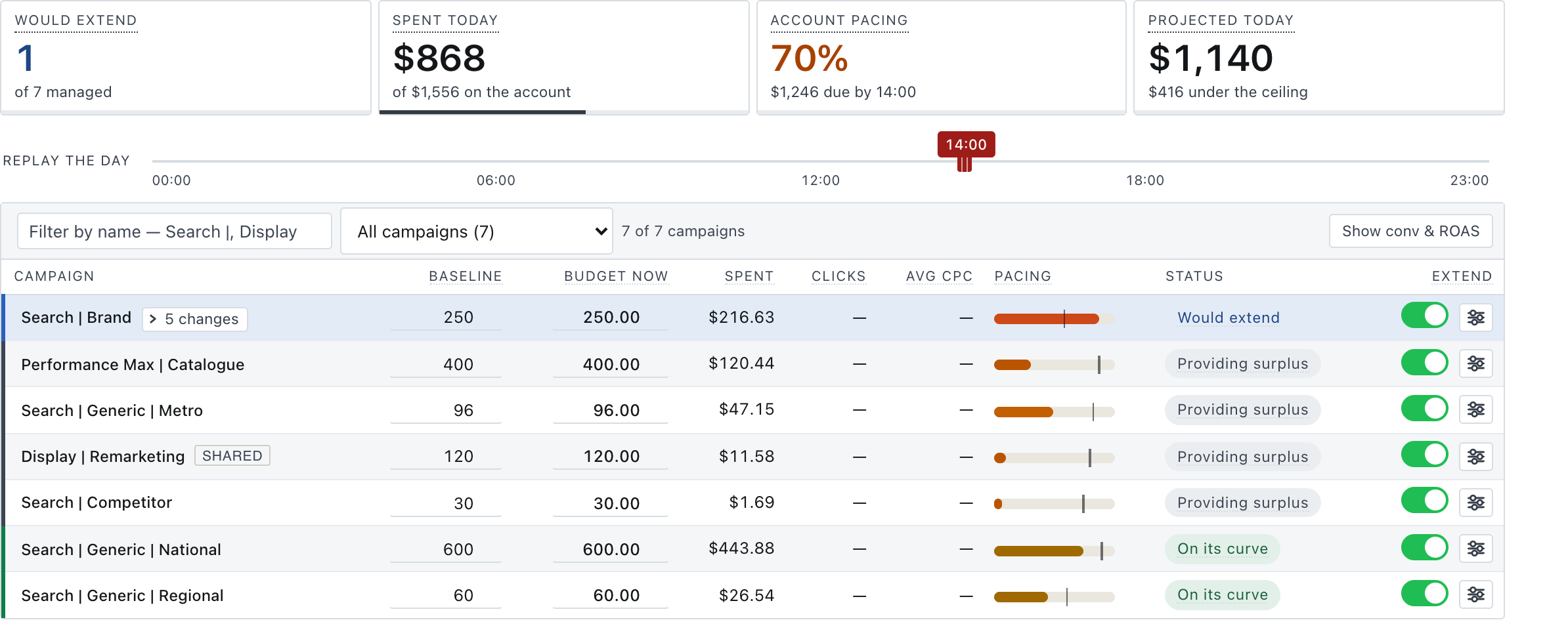
Made-up numbers, real rules: extended funding on, redistribution on, a $40 cost-per-conversion target, no raise past twice the baseline. Demand on Campaign A surges at six in the evening, when nobody is at a desk, so it gets budget twice: allocated from Campaign B’s surplus in the morning, then added at six. Drag the hour and watch each campaign’s status change.
A campaign running ahead of its own curve has its budget extended, only if it clears the target and never past its cap, and surplus from a campaign below its curve is used first. On your account every line of this log is a real change, recorded with its reason.
That is one day, on one lever. Across the month the daily budgets themselves move the same way — see Dynamic budget allocation.
Your campaigns never go dark while there is demand.
Your account reacts to demand around the clock, not when somebody is at a desk.
More money goes only where more money has been shown to work, and comes off where it has stopped. Never past the limits you set.
Orchadstrate keeps your budget where the demand is.
Google’s automation is good at deciding how to bid and where to appear, and it works best with a budget behind it that keeps up. Orchadstrate is that budget, managed hour by hour — extended for the campaigns that are converting, drawn from the ones that are not, never past your monthly limit or a campaign’s own cap, and every change written down with its reason. The same thing happens across the month, on a different lever. The daily budgets themselves come off campaigns whose performance has dropped, and go to campaigns that are hitting their targets and running out of budget. A campaign is judged on the result you choose for it — a minimum return, or a maximum cost per acquisition — and on the conversions you say count for it. One account can hold both.
The same three things, whatever your sector.
The same three things matter in every account. What changes is the week they matter most.
Charity, end of financial year
Giving concentrates into the last seventy-two hours of June.
- The appeal keeps serving through those seventy-two hours instead of capping out on the biggest night of the year.
- A surge at eleven at night is met at eleven at night, not at the next morning’s review.
- Budget the year-round campaigns will not spend funds the appeal before a dollar more is asked for.
Retail, Black Friday
Demand arrives five or ten times over, on a weekend, across four days.
- The campaign that would hit its cap at ten in the morning is still bidding at ten at night.
- Four days including a weekend, when the account is at its most valuable and least watched.
- Surplus across the rest of the account is offered to what is converting before the ceiling is touched.
Anything that goes viral
Branded search goes vertical with no warning and nobody planned for it.
- The brand campaign — the cheapest traffic in the account — is the first to run out, and does not.
- It is noticed within the hour whether or not anybody is at a desk.
- Funded from what is already sitting unspent elsewhere in the account first.
Dynamic budget allocation.
Performance changes in real time. Budget changes do not — that is a manual process. So a campaign that was performing gets left running, performance degrades, and it is not picked up until month end. By then the budget is spent and the overall CPA is unacceptably high.
Nothing flags it in the meantime. A campaign spending its whole budget does not hit a cap or trigger an alert, so there is nothing to notice until somebody totals the month. On an account reviewed every morning it gets caught in a week. On the rest it runs the full month.
-
It finds them while the month is still running
Campaigns coming in over your cost per conversion, or under your return, for more days than you allow. You set the target and you set the number of days.
-
It moves the money
To campaigns that are hitting your targets and running out of budget before the end of the day. The account commits the same total and buys more with it.
-
Or it stops spending it
If no campaign on the account qualifies for it, the budget comes off and the account commits less. Money that is not on a campaign line should not be spent.
We extend and expand what Google already does.
Google already flexes your budget: an average daily budget can spend up to twice its amount on a promising day, and demand-led pacing is rolling out now on Search and Shopping. All of it is worth having and we replace none of it. But each of those reshapes one campaign's own budget. The single place Google moves money between campaigns is a shared budget — and that leaves Performance Max out. We add the hour instead of the day — and the minute, when a campaign is about to run out. Surplus moved between any campaigns you choose, your own rules, and a record of every change.
Keep Smart Bidding and Performance Max exactly as they are. Google decides how to bid; Orchadstrate decides how long there is budget to bid with. They act on separate controls, which is why they coexist rather than compete.
What it costs.
Priced on the Google Ads spend under management, averaged over three months so a seasonal peak does not move you. Every plan gets the whole engine. What a higher plan buys is how often the account is checked, how many accounts it covers, and on Professional your own name and logo on the board.
The trial is free and needs no card.
See what your campaigns actually do.
For seven days the trial watches your account hourly and shows what would have been done differently, changing nothing. Subscribing is when the budgets start being managed.
You choose which accounts it can see, and you revoke it from your own Google settings. The rest is in the FAQs.